There are several steps that have to be performed. We want to install MySQL database server by deploying https://hub.docker.com/_/mysql image. There have to be done some things around than just pulling image and running container. Follow through the article, and we'll provide all the necessary steps.
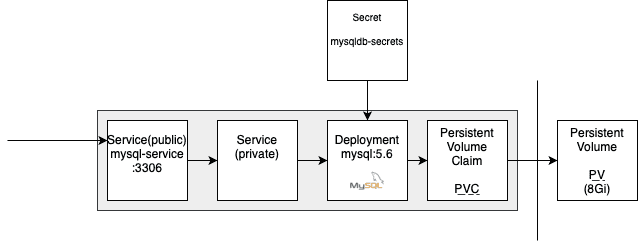
0. Create Kubernetes Secret called ROOT_PASSWORD.
Files/scripts
- Script
0-encode-base64.zshto encode password into base64.
#!/usr/bin/zsh
echo -n $1 | base64- Secret
0-mysql-secret.yamlfor mysql root password.
apiVersion: v1
kind: Secret
metadata:
  name: mysqldb-secrets
type: Opaque
data:
  ROOT_PASSWORD: cGFzc3dvcmQ=
Steps
- Encode password via script to put into Kubernetes Secret 1.
zsh 0-encode-base64.zsh password
cGFzc3dvcmQ=- Put output base64 encoded password into secret and apply it.
kubectl apply -f 0-mysql-secret.yaml
secret/mysqldb-secrets created- Check all secrets in your cluster.
kubectl get secret
NAME                  TYPE                                  DATA   AGE
default-token-4nxzv   kubernetes.io/service-account-token   3      97d
mysqldb-secrets       Opaque                                1      9m13s
pwnstepo-registry kubernetes.io/dockerconfigjson 1 96d- Check newly created secret.
kubectl describe secret mysqldb-secrets
Name:         mysqldb-secrets
Namespace:    default
Labels:       <none>
Annotations:  <none>

Type:  Opaque

Data
====
ROOT_PASSWORD:  11 bytes
I. Create PV and PVC on it. Create MySQL Deployment using PVC as a storage.
Files/Scripts
- Kubernetes Persistent Volume and Persistent Volume Claim
1-pv-pvc-mysql.yaml.
apiVersion: v1
kind: PersistentVolume
metadata:
  name: mysql-pv
  labels:
    type: local
spec:
  storageClassName: manual
  capacity:
    storage: 8Gi
  accessModes:
    - ReadWriteOnce
  hostPath:
    path: "/mnt/mysql-data"
---
apiVersion: v1
kind: PersistentVolumeClaim
metadata:
  name: mysql-pvc-claim
spec:
  accessModes:
    - ReadWriteOnce
  resources:
    requests:
      storage: 8Gi
storageClassName: do-block-storage- Internal Service and Deployment
2-deployment-mysql.yaml.
apiVersion: v1
kind: Service
metadata:
  name: mysql
spec:
  ports:
  - port: 3306
  selector:
    app: mysql
  clusterIP: None
---
apiVersion: apps/v1 # for versions before 1.9.0 use apps/v1beta2
kind: Deployment
metadata:
  name: mysql
spec:
  selector:
    matchLabels:
      app: mysql
  strategy:
    type: Recreate
  template:
    metadata:
      labels:
        app: mysql
    spec:
      containers:
      - image: mysql:5.6
        name: mysql
        env:
        - name: MYSQL_ROOT_PASSWORD
          valueFrom:
            secretKeyRef:
              name: mysqldb-secrets
              key: ROOT_PASSWORD
        ports:
        - containerPort: 3306
          name: mysql
        volumeMounts:
        - name: mysql-persistent-storage
          mountPath: /var/lib/mysql
      volumes:
      - name: mysql-persistent-storage
        persistentVolumeClaim:
          claimName: mysql-pvc-claim
Steps
- Create PV & PVC.
kubectl apply -f 1-pv-pvc-mysql.yaml
persistentvolume/mysql-pv created
persistentvolumeclaim/mysql-pvc-claim created- Apply MySQL Deployment w/ Service.
kubectl apply -f 2-deployment-mysql.yaml
service/mysql created
deployment/mysql created
II. Expose MySQL behind publicly accessible Service.
Files/Scripts
- Public Service
3-service-mysql.yaml.
apiVersion: v1
kind: Service
metadata:
  name: mysql-service
spec:
  selector:
    app: mysql
  ports:
  - protocol: TCP
    port: 3306
    targetPort: 3306
Steps
- Create public Service.
kubectl apply -f 3-service-mysql.yaml
service/mysql-service created- Confirm that public service is created successfully.
kubectl get svc
NAME                      TYPE        CLUSTER-IP      EXTERNAL-IP   PORT(S)    AGE
...
mysql                     ClusterIP   None            <none>        3306/TCP   7m1s
mysql-service             ClusterIP   10.245.2.59     <none>        3306/TCP   28s
...
III. Your mysql-service is live now!
Database server is then accessible in the closter on mysql-service i.e. mysql-service:3306.