Follow these steps to achieve desired functionality like previously shown in
mysql-deployment.
Used image of Redis https://hub.docker.com/_/redis has to be wrapped in the similar manner and exposed as redis-service:6379.
This tutorial shows cluster overview by Lens (via kubectl) rather than raw kubectl CLI.
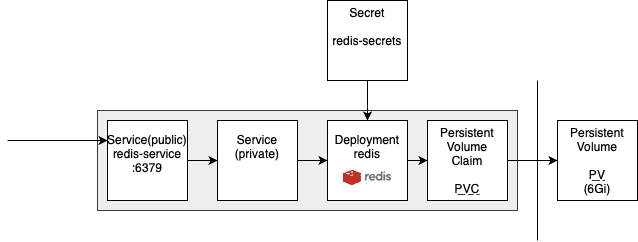
0. Generate base64 password & apply Kubernetes Secret.
Generate base64 password and place it into redis-secret file.
Files/scripts
- Script
0-encode-base64.zsh.
#!/usr/bin/zsh
echo -n $1 | base64- Kubernetes Secret
0-redis-secret.yaml.
apiVersion: v1
kind: Secret
metadata:
  name: redis-secrets
type: Opaque
data:
  REDIS_PASSWORD: cGFzc3dvcmQ=
Steps
- Encode password via script to put into Kubernetes Secret.
chmod u+x 0-encode-base64.zsh
zsh 0-encode-base64.zsh password
cGFzc3dvcmQ=- Put output base64 encoded password into secret and apply it.
kubectl apply -f 0-redis-secret.yaml
secret/redis-secrets created
I. Create PV & and make PVC on it.
Files/scripts
- Kubernetes Persistent Volume and Persistent Volume Claim
1-pv-pvc-redis.yaml.
apiVersion: v1
kind: PersistentVolume
metadata:
  name: redis-pv
  labels:
    type: local
spec:
  storageClassName: manual
  capacity:
    storage: 6Gi
  accessModes:
    - ReadWriteOnce
  hostPath:
    path: "/mnt/data/redis"
---
apiVersion: v1
kind: PersistentVolumeClaim
metadata:
  name: redis-pvc
spec:
  accessModes:
    - ReadWriteOnce
  resources:
    requests:
      storage: 6Gi
  storageClassName: do-block-storage
Steps
- Create PV & PVC.
kubectl apply -f 1-pv-pvc-redis.yaml
persistentvolume/redis-pv created
persistentvolumeclaim/redis-pvc created
Result in Lens

II. Create Service (internal) & Deployment.
Files/scripts
- Internal Service and Deployment
2-deployment-redis.yaml.
apiVersion: v1
kind: Service
metadata:
  name: redis
spec:
  ports:
  - port: 6379
  selector:
    app: redis
  clusterIP: None
---
apiVersion: apps/v1 # for versions before 1.9.0 use apps/v1beta2
kind: Deployment
metadata:
  name: redis
spec:
  replicas: 1
  selector:
    matchLabels:
      app: redis
  strategy:
    type: Recreate
  template:
    metadata:
      labels:
        app: redis
    spec:
      containers:
      - name: redis
        image: redis
        command: ["redis-server"]
        args:
        - "--save"
        - "20"
        - "1"
        - "--loglevel"
        - "warning"
        - "--requirepass"
        - "cGFzc3dvcmQ="
        #args:
        #  - "--requirepass"
        #  - "${REDIS_PASSWORD}"
        ports:
        - containerPort: 6379
        volumeMounts:
        - name: redis-data
          mountPath: /data
      volumes:
      - name: redis-data
        persistentVolumeClaim:
          claimName: redis-pvc
Steps
kubectl apply -f 2-deployment-redis.yaml
service/redis created
deployment/redis created
Result in Lens

III. Create Service (exposed on :6379) + link the internal one.
Files/scripts
- Accessible Service
3-service-redis.yaml.
apiVersion: v1
kind: Service
metadata:
  name: redis-service
spec:
  selector:
    app: redis
  ports:
  - protocol: TCP
    port: 6379
    targetPort: 6379
Steps
kubectl apply -f 3-service-redis.yaml
service/redis-service created
Result in Lens

IV. Your redis-service is live now!
Redis server is then accessible on redis-service i.e. redis-service:6379. There, however, have to be protocol and password like tcp://redis-service:6379?auth=PASSWD in your app deployment/setup.
Tips on how to use Redis!
Both MySQL and Redis are were tested on multireplica deployment of our LAMP application that we previously programmed. We tried to port basic LAMP stack into Kubernetes to be cloud ready.
Visualization on how containers share databases
Both have persistent storage. Database for obvious purposes, Redis for keeping sessions live in case of reboots or death of containers during lifecycle.
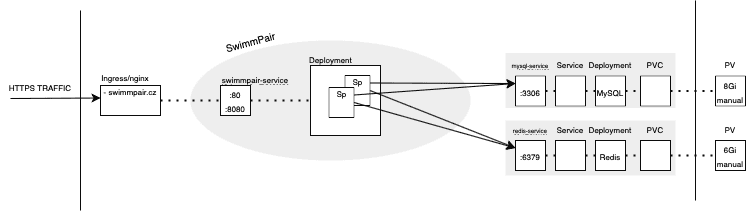
- mysql-service:3306,
- redis-service:6379.
For the PHP app, however, we have to change php.ini to adjust PHP for using Redis for session handling as follows:
session.save_handler: 'redis'
session.save_path: 'tcp://redis:6379?auth=aGVzbG8='
Our used docker image thecodingmachine/php:7.2-v4-apache has a specific way how to override these params via ENV VARIABLES. Both docker-compose and Kubernetes Deployment have same notation for setting environment variables.
    environment:
      PHP_INI_SESSION__SAVE_HANDLER: 'redis'
      PHP_INI_SESSION__SAVE_PATH: 'tcp://redis:6379?auth=aGVzbG8='
After that we should be able to call phpinfo(); to see session.save_handler and session.save_path set up as mentioned above.
Happy using!